How to Verify a PDF’s Noindex Header After a Download Redirect

You want readers to download a PDF directly, while keeping the file itself out of Google Search. Your first check shows X-Robots-Tag: noindex on the download URL. Follow the redirect and the final PDF may tell a different story. In the sample below, even the final HEAD response showed the header while a full download omitted it.
For a PDF, put the directive on the HTTP response that serves the file. Google supports X-Robots-Tag on non-HTML resources and must be able to fetch the URL to see the rule. If the document requires confidentiality, restrict access with authentication. A public PDF with a search directive is still downloadable. See Google’s noindex guidance and the guide to indexing and snippet controls.
1. Follow the link with a full GET
Start from the exact download link a visitor uses. The commands below use a small local test server with separate origins for the entry and the file. Run node lab.mjs in one terminal and use another for the probes. For your own site, replace the URL with a public test download you control.
url='http://127.0.0.1:4407/download/before'
curl -sSL --max-redirs 5 --max-time 30 -D get.headers -o sample.pdf \
  -w 'final=%{url_effective} status=%{http_code}\n' "$url"
The recorded result ended at http://127.0.0.1:4408/before/sample.pdf with status 200. The headers file contains a block for each response. The first block was a 302 with X-Robots-Tag: noindex. The last block served application/pdf and lacked the header. The downloaded body was a valid one-page PDF.
Read the last block, confirm that it belongs to the expected file, and open the downloaded PDF if the payload is small. A login screen or HTML error page needs its own diagnosis even when the status is 200. Use the HTTP status reference and the redirect chain walkthrough if the chain ends somewhere unexpected.
2. Compare HEAD and a byte-range GET
Run these as separate probes against the same entry URL.
curl -sSIL --max-redirs 5 --max-time 30 -D head.headers -o /dev/null "$url"
curl -sSL --max-redirs 5 --max-time 30 -H 'Range: bytes=0-31' \
  -D range.headers -o sample.part "$url"
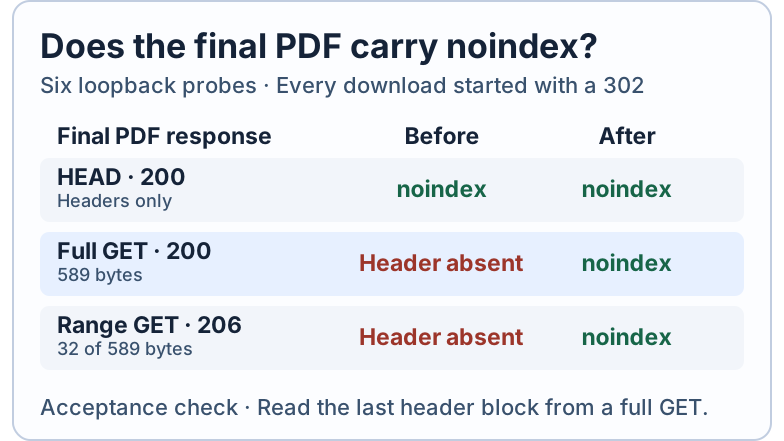
The fixture deliberately serves different headers for HEAD and GET before the fix. HTTP expects broadly matching response metadata, with exceptions for values known only during content generation. A server can also ignore a Range request and send 200 with the full body. Use a small sample you control, and record what the server actually returns. The Range probe helps check a second delivery path if your service uses partial responses. The full GET remains the main acceptance check. See RFC 9110 on HEAD and range requests.
| Final file response | Before | After |
|---|---|---|
HEAD, 200 | noindex | noindex |
Full GET, 200, 589 bytes | Header absent | noindex |
Range GET, 206, 32 bytes | Header absent | noindex |
All six requests followed a 302. The Range responses both reported Content-Range: bytes 0-31/589. Switch url to http://127.0.0.1:4407/download/after and repeat the probes to see the repaired responses. The full PDF bytes matched before and after. The change was in delivery headers. The captured responses were recorded with curl 8.7.1 in a controlled loopback lab.
3. Check crawl rules on the file’s origin
Take the final URL from the GET output. Look up /robots.txt on that URL’s protocol, host and port. In this fixture that is http://127.0.0.1:4408/robots.txt, which returned 200 with Allow: / under User-agent: *. A production download can move to a different host, such as a public file CDN, with different rules from the site that links to it. See Google’s robots.txt scope rules and the robots.txt guide.
For a public URL on a standard HTTP or HTTPS port, Fennec’s robots.txt checker can fetch the origin’s file and show its rules. Compare the rule for the relevant crawler with the final PDF path yourself. Use the saved GET headers to check X-Robots-Tag. The checker’s input is a website or public resource URL, and its output describes robots.txt.
In a separate check, the locally run Fennec handler received the W3C sample PDF URL. It fetched https://www.w3.org/robots.txt, which returned 200 with text/plain. The recorded output shows which URL the checker actually fetched.
For a real handoff, save the entry URL, final URL, final status, content type and header value. If your service uses byte ranges, attach a range capture as well. If the full GET is missing the header, check the policy on the service that actually delivers the file and rerun the same probes. If Google already lists the PDF, follow the indexing troubleshooting workflow to distinguish the current response from Google’s last processed version. The local captures measure HTTP delivery. Google’s crawl and indexing outcomes require separate evidence.