Google Indexing Troubleshooting: Fix Discovery, Render, and Canonical Gaps

If a page is not indexed in Google, do not start by clicking Request indexing again and again. Start by confirming the page’s role, then test whether Google can discover it, fetch it, render the important content, read the indexing signals, and accept it as the right canonical result.
Google describes Search as a pipeline of crawling, indexing, and serving results, which means a page can be reachable without being indexed, and indexed without meaningfully appearing for queries. That is why Google indexing troubleshooting should move from the earliest possible failure to the latest one instead of jumping straight to rankings.
If you are not yet sure whether the problem really belongs to indexing or to an earlier stage, start with the broader Google SEO diagnostic workflow and then return here for the indexing-specific checks.
Start with the page role, not the symptom
Before debugging a report status, decide what this URL is supposed to do.
Record:
- the exact preferred URL;
- whether it should be indexed, redirected, consolidated, or removed;
- the template or content type it belongs to;
- the language version that should rank;
- the evidence you already have from Search Console, logs, or HTML.
This prevents a common mistake: treating every non-indexed URL as a defect. Google’s Page Indexing reporting distinguishes between URLs that are intentionally excluded and URLs that should be fixed. Redirects, alternate duplicates, filtered URLs, and private pages may be working exactly as intended.
If the team is still arguing about whether a statement is documented, reproducible, measured, or only interpretive, standardize that first with the Google SEO evidence matrix.
The practical order for Google indexing troubleshooting
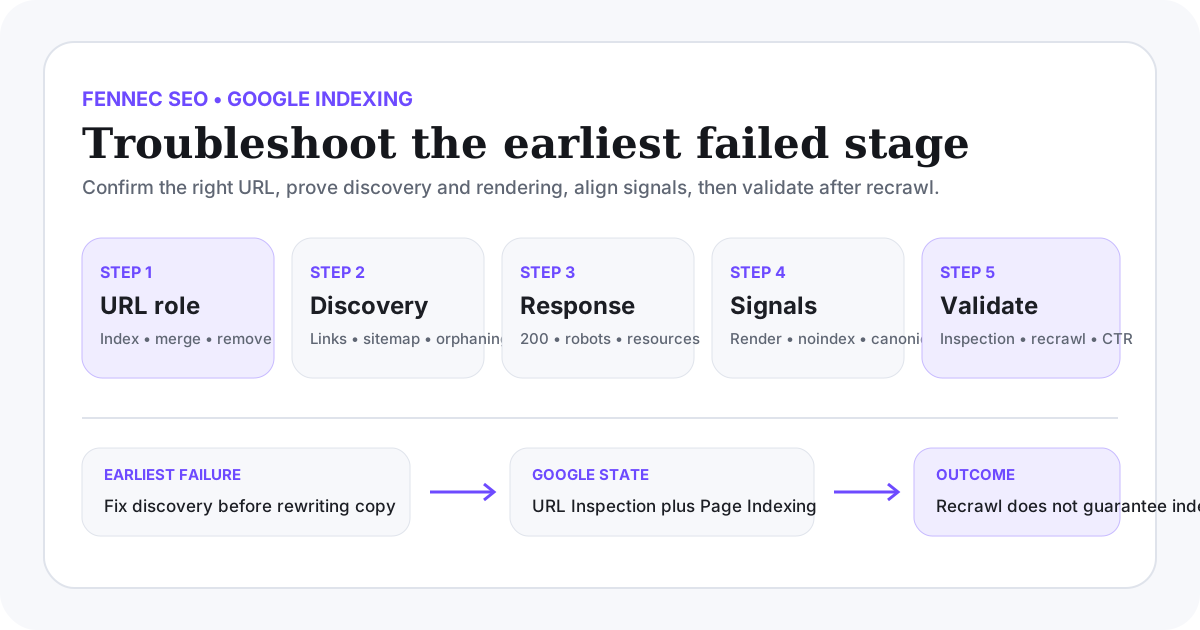
Use this sequence:
- confirm the exact canonical URL and page role;
- check whether Google can discover that URL;
- check whether Googlebot gets a stable response;
- compare raw HTML with rendered output;
- verify
noindex, canonical, and related signals; - check whether Google selected the expected canonical;
- ask whether the page is distinct and worth indexing.
If an earlier step fails, do not spend time rewriting copy or resubmitting sitemaps. Later optimization rarely compensates for a broken earlier gate.
Step 1: Confirm the exact URL you want indexed
Normalize:
- protocol;
- hostname;
- path;
- trailing slash behavior;
- case sensitivity;
- parameters and tracking variants.
Then ask whether other site signals support the same destination:
- internal links;
- sitemap entries;
- hreflang alternates;
- canonical tags;
- redirects;
- product, blog, or Wiki ownership.
If those signals point in different directions, Google may choose another canonical or keep treating the page as a duplicate cluster instead of a unique document.
For Fennec teams, this is where the Google SEO guide, Google SEO audit checklist, and the shorter Indexing wiki entry help set the page’s role before you change templates.
Step 2: Check discovery before you blame indexing
Google cannot index a page it does not reliably discover.
Google’s sitemap guidance says a sitemap helps search engines discover important URLs, especially on large sites or when pages are not well linked. But a sitemap is a discovery aid, not an indexing guarantee.
Check whether the preferred URL has:
- at least one crawlable internal
<a href>link from an indexable page; - inclusion in the correct XML sitemap;
- no orphaned state caused by navigation, filters, or pagination changes;
- internal links that point directly to the final preferred URL;
- no accidental dependence on search forms or JavaScript-only interactions for discovery.
Use the link checker and sitemap checker to narrow candidates, then verify the actual source HTML.
Discovery failure patterns
| Symptom | Likely cause | What to verify next |
|---|---|---|
| URL exists in sitemap but gets no crawl activity | Weak internal linking or too many low-value sitemap entries | Template links and sitemap quality |
| URL is linked only through JavaScript interaction | Discovery depends on rendered state | Raw HTML and rendered DOM |
| Google finds a parameter URL instead | Internal links or canonicals support the wrong version | Link source and canonical cluster |
Step 3: Make sure Googlebot receives a stable, useful response
Google’s technical requirements still begin with one simple point: Googlebot must be able to access the page and receive an HTTP status that matches reality.
Check:
- final status code;
- redirect hops;
- robots.txt access;
X-Robots-Tag;- whether important CSS, JavaScript, and image resources are reachable;
- whether the page returns a real
200with indexable content.
Useful commands:
curl -I -L https://example.com/page/
curl -L https://example.com/robots.txt
Do not confuse a fetchable response with an indexable page. A URL that returns 200 but shows a thin error view, empty template, or expired-product shell can still be treated as a soft 404 or low-value page.
Step 4: Compare raw HTML with rendered output
Google’s JavaScript SEO guidance continues to describe crawling, rendering, and indexing as separate phases. If the page needs JavaScript to expose its main content, links, canonical, or robots directives, you need to verify what Google can see after rendering rather than trusting a local browser session.
Compare:
- the server response HTML;
- the fully rendered DOM;
- Search Console’s indexed view and live test when available.
Look for mismatches in:
- title and H1;
- main body copy;
- canonical;
- robots directives;
- structured data;
- internal links to the next useful step;
- language-specific content and hreflang targets.
Use Bot Simulator for a quick comparison, but use URL Inspection when you need Google’s own observed state for a managed property.
Step 5: Verify indexing directives and canonical consistency
Most indexing dead ends come from conflicting signals, not one missing tag.
Check whether the URL is:
- blocked by
noindex; - blocked by
X-Robots-Tag; - prevented from exposing
noindexbecause robots.txt blocks crawling; - canonicalized to another URL;
- part of a duplicate cluster with stronger internal links elsewhere;
- mislabeled across language versions.
Google’s guidance on blocking indexing is explicit about a key limitation: if you want Google to see noindex, the page must be crawlable. Blocking the same URL in robots.txt can stop Google from seeing the directive at all.
For multilingual sites, also confirm that:
- each language page is self-canonical;
- alternates reference the right peer URLs;
- internal links do not constantly route authority back to the wrong language version.
The canonical checker, hreflang checker, and broader Technical SEO workflow are useful here, but the real question is whether every signal supports the same preferred page.
Step 6: Use URL Inspection and Page Indexing together
For one URL, URL Inspection helps answer:
- what Google last crawled;
- whether the page is indexable right now;
- which canonical you declared;
- which canonical Google selected;
- whether the live test can reach the current page state.
For a pattern, the Page Indexing report helps you group exclusions by directory, template, or reason.
That combination matters because neither tool is complete on its own:
- URL Inspection is precise for one URL, but it does not describe the entire site pattern.
- The Page Indexing report reveals patterns, but it does not explain every root cause by itself.
- A live test shows current accessibility, not a promise of future indexing.
Report states to interpret carefully
| Reported state | Better question |
|---|---|
| Discovered, currently not indexed | Is Google finding too many low-value URLs or not enough internal support for this one? |
| Crawled, currently not indexed | Is the page distinct, complete, and worth keeping as its own canonical? |
| Duplicate without user-selected canonical | Which version do links, redirects, and sitemap really support? |
| Alternate page with proper canonical tag | Is this intended duplication or a mistaken consolidation? |
Excluded by noindex | Was that directive intentional and still present in the fetchable HTML? |
Do not turn these states into absolute diagnoses without checking HTML, links, and page purpose.
Step 7: Ask whether the page deserves its own index entry
Not every indexing issue is technical.
Google’s Search documentation repeatedly separates eligibility from performance. A page can be technically accessible and still remain out of the index because it is too similar to another page, too weak compared with the result set, or too thin to justify its own canonical slot.
Ask:
- does this page solve a distinct user task better than another URL on the site;
- does it contain original evidence, workflow, or decision support;
- is it substantially different from near-duplicate pages in the same language or another language;
- is the page type aligned with what current search results reward;
- should this content be merged into a stronger existing page instead.
If the honest answer is “this should probably be one stronger page, not three near-copies,” consolidation is more credible than repeated indexing requests.
What Request Indexing can and cannot do
Google’s recrawl guidance is useful, but limited.
It can help after you fix a real issue such as:
- a wrong canonical;
- accidental
noindex; - a broken render;
- a newly published page that is now properly linked.
It does not guarantee:
- indexing;
- faster ranking gains;
- a specific recrawl time;
- recovery for pages that still lack value or consistent signals.
Google also notes that repeated requests do not make crawling happen faster. Use the request only after the page’s state is actually worth reprocessing.
A practical Fennec workflow for indexing cases
For one affected page or template:
- confirm the intended URL and page owner in the cluster;
- review internal links with Link Checker;
- confirm sitemap inclusion with Sitemap Checker;
- inspect canonical, hreflang, and response behavior with Canonical Checker and related validators;
- compare raw and rendered content with Bot Simulator;
- validate Google-specific state in GSC Management or Search Console;
- ship the smallest fix batch, then recheck the same evidence.
This keeps the workflow anchored in proof instead of guessing from one screenshot or one report label.
Validation after the fix
After releasing a fix, record:
- the exact change date;
- whether the preferred URL returns the right HTTP status;
- whether canonical, hreflang, and noindex signals now align;
- whether the page appears correctly in raw and rendered HTML;
- whether URL Inspection live test reflects the intended state;
- whether the Page Indexing reason changes after enough recrawl time;
- whether impressions, clicks, and language matching improve in Search Console once data is available.
Do not claim success on the same day unless the only question was technical accessibility. Indexing, recrawl timing, and search visibility can take longer.
What a finished indexing diagnosis should produce
A finished Google indexing troubleshooting pass should end with:
- one precise affected URL set or template;
- the earliest failed stage in the pipeline;
- direct evidence for the failure;
- the smallest safe fix;
- a validation checklist with dates;
- a clear distinction between “fixed technically” and “confirmed in Google reporting.”
That is the difference between an indexing workflow and a superstition loop.
Sources
- Google Search Central: How Search works
- Google Search Central: Build and submit a sitemap
- Google Search Central: Prevent your content from appearing in Google Search
- Google Search Central: Ask Google to recrawl your URLs
- Google Search Central: JavaScript SEO basics
- Google Search Console Help: About Page Indexing report
- Google Search Console Help: Inspect a URL
Q&A
What should you check first when Google is not indexing a page?
First confirm the exact URL that should be indexed and whether that URL is meant to be indexable at all. Then check discovery, crawl response, rendered content, indexing directives, and canonical consistency in that order.
Does requesting indexing guarantee Google will index the page?
No. URL Inspection can ask Google to recrawl a managed URL, but Google does not guarantee indexing, ranking, or a faster outcome from repeated requests.
Can a sitemap force Google to index a page?
No. A sitemap helps Google discover important URLs, but it does not replace internal links, content quality, canonical consistency, or indexing eligibility.