Find the redirect hop that changes the destination: a reproducible lab

A URL finishes with 200 OK, but the visitor lands on the wrong plan. Which hop changed the destination? The final status cannot answer that question. Save the response at each step, then locate the first point where the path or a meaningful parameter changes unexpectedly.
This walkthrough uses a deliberately broken local website, tested on 28 October 2026 with curl 8.7.1 and a Chromium browser. It is a synthetic experiment, not a production incident, a Fennec product-interface test, or evidence of search performance. You will reproduce three failures and compare their corrected routes: a lost parameter, a redirect loop, and navigation that happens only after JavaScript runs.
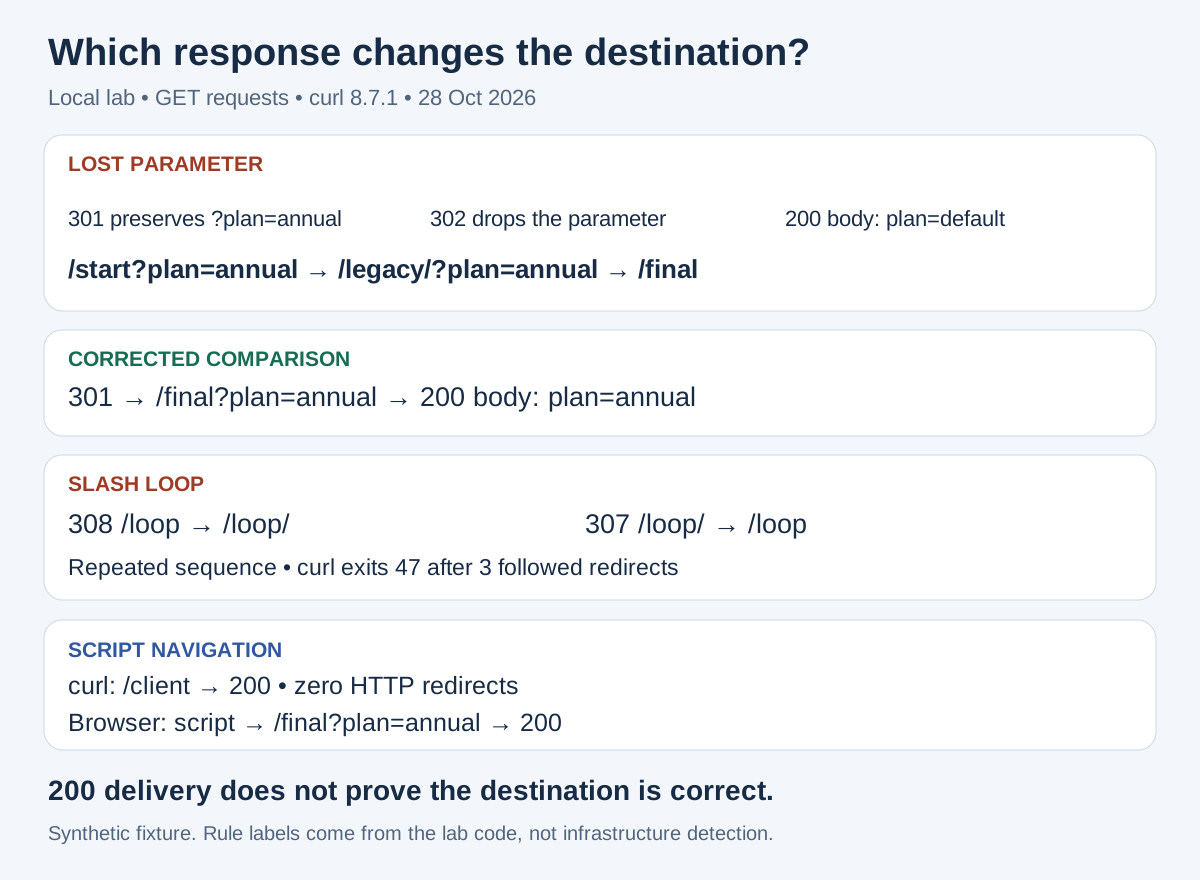
Local lab results. The labels identify rules deliberately written into this fixture; they do not identify the infrastructure responsible for a real site’s response.
1. Start with the exact request
Copy the starting URL before following redirects. Record the method, query string, time, login/cookie state and browser context. For a page navigation, start with a GET. A HEAD check can help, but do not substitute it for the failing GET: different methods can take different application paths.
Use the HTTP status-code reference to interpret the response. Google distinguishes permanent redirects such as 301/308 from temporary redirects such as 302/307 in its redirect documentation. Choose according to the intended move. A chain containing different status codes does not, by itself, establish a defect.
In this lab, plan=annual is a meaningful input. The destination displays plan=annual only when that parameter survives. On your site, first establish which parameters actually affect the user’s task; retaining every tracking parameter is not automatically the correct design.
2. Run the small local website
Save the following as redirect-lab.mjs. It needs Node.js and uses only a built-in module. Start it with node redirect-lab.mjs, leave that terminal open, and run the curl commands in a second terminal. It listens only on your own computer at port 4398; choose another unused port in both the code and commands if necessary.
import http from 'node:http';

// Synthetic loopback-only lab. This is not a production incident or a Fennec feature test.
export const labVersion = 'redirect-lab-1';
export function createLab() {
  return http.createServer((req, res) => {
    const u = new URL(req.url, 'http://127.0.0.1');
    const hop = (status, target, rule) => {
      res.writeHead(status, { Location: target, 'Cache-Control': 'no-store', 'X-Lab-Rule': rule });
      res.end();
    };
    if (u.pathname === '/start') return hop(301, '/legacy/' + u.search, 'entry');
    if (u.pathname === '/legacy/') return hop(302, '/final', 'legacy-map');
    if (u.pathname === '/fixed') return hop(301, '/final' + u.search, 'direct-map');
    if (u.pathname === '/loop') return hop(308, '/loop/', 'add-slash');
    if (u.pathname === '/loop/') return hop(307, '/loop', 'remove-slash');
    if (u.pathname === '/loop-fixed') return hop(308, '/final', 'single-slash-policy');
    if (u.pathname === '/client-fixed') return hop(302, '/final?plan=annual', 'http-route');
    res.setHeader('Cache-Control', 'no-store');
    res.setHeader('Content-Type', 'text/html; charset=utf-8');
    if (u.pathname === '/client') {
      res.end('<!doctype html><title>Client navigation</title><h1>Client navigation</h1>' +
        '<script>location.replace("/final?plan=annual")</script>');
      return;
    }
    if (u.pathname === '/final') {
      res.end('<!doctype html><title>Plan destination</title><h1>Plan destination</h1><p id="plan">plan=' +
        (u.searchParams.get('plan') === 'annual' ? 'annual' : 'default') + '</p>');
      return;
    }
    res.statusCode = 404;
    res.end('<!doctype html><title>Missing lab route</title><h1>Missing lab route</h1>');
  });
}
if (process.argv[1] === new URL(import.meta.url).pathname) {
  createLab().listen(4398, '127.0.0.1', () => console.log(labVersion + ' http://127.0.0.1:4398'));
}
Stop the server with Ctrl+C when finished. The fixtures use no-store to reduce cache effects in this experiment. They do not simulate HTTPS, an edge cache, authentication or Googlebot.
3. Find the response that drops the parameter
First inspect just the starting response. This command discards the body, saves headers to standard output and does not follow the redirect:
curl --noproxy '*' -sS --max-time 10 -D - -o /dev/null \
  'http://127.0.0.1:4398/start?plan=annual'
Then capture the entire HTTP chain. -L follows HTTP redirects; --max-redirs 3 bounds the experiment. -D - prints each response header block, and the final line reports the last response, redirects followed and effective URL. These options are documented in the curl manual.
curl --noproxy '*' -sS -L --max-redirs 3 --max-time 10 -D - \
  -w '\nSUMMARY %{http_code} %{num_redirects} %{url_effective}\n' \
  'http://127.0.0.1:4398/start?plan=annual'
The relevant lines from the actual run are below. Routine date and connection headers are omitted; no status or destination has been changed.
HTTP/1.1 301 Moved Permanently
Location: /legacy/?plan=annual
X-Lab-Rule: entry

HTTP/1.1 302 Found
Location: /final
X-Lab-Rule: legacy-map

HTTP/1.1 200 OK
...<p id="plan">plan=default</p>
SUMMARY 200 2 http://127.0.0.1:4398/final
The first response preserves the parameter. The response from /legacy/?plan=annual emits /final without it. That is the first faulty transition. The final 200 confirms a response was delivered; the body shows the wrong plan.
A relative Location must be resolved against the URL that returned it. Do not concatenate it to the original starting URL. Record the resolved next URL alongside the raw header.
Repeat the same command with /fixed?plan=annual. In this fixture, the corrected entry sends the request directly to the intended destination:
HTTP/1.1 301 Moved Permanently
Location: /final?plan=annual
X-Lab-Rule: direct-map

HTTP/1.1 200 OK
...<p id="plan">plan=annual</p>
SUMMARY 200 1 http://127.0.0.1:4398/final?plan=annual
This is a working comparison route, not a change to /start. In a real repair, change the identified rule and retest the original failing URL as well as direct visits to the destination. Fewer hops alone would not prove that the repair preserved the user’s task.
4. Recognize a loop without increasing the limit
Run the same full-chain command with /loop. The raw trace alternates:
| Response from | Status | Location | Rule in this fixture |
|---|---|---|---|
/loop | 308 | /loop/ | add-slash |
/loop/ | 307 | /loop | remove-slash |
/loop | 308 | /loop/ | add-slash |
/loop/ | 307 | /loop | remove-slash |
curl stops with exit code 47 and Maximum (3) redirects followed. There are four response blocks because the initial request plus three followed redirects reaches the next redirect response. This is the curl limit selected for the lab, not a claimed Googlebot limit. The repeated URL sequence is the evidence of the loop; an exit code alone would also fit a long non-repeating chain.
The /loop-fixed comparison uses a single slash policy and reaches /final after one 308. On a real site, compare slash rules across application routing and any upstream redirect configuration. A Server header or a vendor name is a clue, not proof of which rule ran. Confirm responsibility using configuration or request-correlated logs. Our X-Lab-Rule labels are known because this server sets them explicitly.
5. Explain why curl sees 200 while the browser moves
Run the full-chain command with /client. It returns 200, zero HTTP redirects and the unchanged /client effective URL. Its HTML contains:
<script>location.replace("/final?plan=annual")</script>
curl retrieves the HTML without running that script. In the browser run, the address changes to /final?plan=annual and the page shows plan=annual. That second document request is JavaScript navigation after a successful response, not a hidden 3xx in the curl trace.
To check this yourself in Chrome:
- Open DevTools → Network before visiting
/client. - Enable Preserve log and Disable cache, then navigate to the exact starting URL.
- Inspect the document requests for
/clientand/final?plan=annualand their status codes. - Inspect the second request’s Initiator information and compare it with the script in the first response.
Chrome’s Network reference explains these controls and initiator information. If you see a browser-generated upgrade or cached redirect on another site, distinguish it from a fresh server response before attributing a rule.
The /client-fixed comparison performs an HTTP 302 to the same destination, so curl now follows one redirect too. This is a lab demonstration of delivery methods. Google recommends server-side redirects where possible and explains that JavaScript redirect discovery depends on rendering. A successful local browser navigation does not prove Google’s rendered or indexed state. For a broader raw-HTML versus rendered-DOM investigation, use the JavaScript SEO debugging guide.
6. Keep a compact evidence record for the real repair
| Save | Why it helps |
|---|---|
| Exact input URL, method and relevant request context | Makes the failure repeatable |
| Each response URL, status, raw Location and resolved target | Locates the first incorrect transition |
| Final URL and visible task result | Separates successful delivery from correct behavior |
| Configuration/log evidence for the suspected rule | Avoids blaming infrastructure from a header alone |
| Original-input retest after the change | Demonstrates the reported failure was repaired |
After a delivery repair, check that important internal links point to the intended destination, then verify canonical and language signals on the final page with the multilingual SEO guide. Those checks do not replace the HTTP trace. Use the SEO diagnostic workflow if the page is delivered correctly but the broader indexing question remains.
When many URLs share the same confirmed rule defect, the batch-audit remediation guide explains how to group fixes without merging unrelated symptoms. Keep the original failing inputs in the retest set. The goal is a correct, stable destination for each request; a shorter chain is useful only when it preserves that behavior.