Search Console Query Clustering for Fan-Out: A Practical Workflow

Search Console query clustering is useful for AI search strategy, but only when the method stays honest about the data.
Google explains that generative search can use query fan-out: a system may issue several related searches across subtopics and data sources before composing a response. Search Console does not reveal that private sequence. It shows the queries that produced impressions or clicks for your site, with privacy omissions and reporting limits.
The practical opportunity is narrower and more reliable:
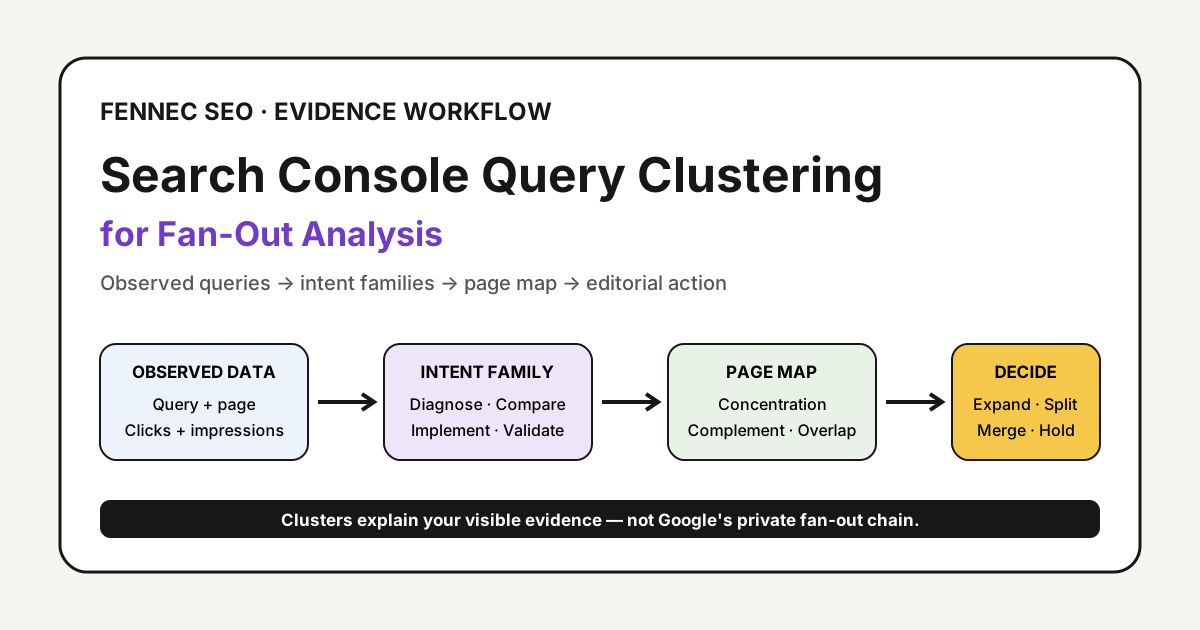
Group the queries you can observe into user-problem families, then decide whether a page should expand, split, consolidate, or remain unchanged.
What Query Clustering Can And Cannot Tell You
Google’s AI optimization guide describes query fan-out as part of generative AI retrieval. That makes topic coverage important, but it does not turn Search Console into a fan-out debugger.
Search Console can help you see:
- Which visible queries led to a page
- Which intents are gaining or losing impressions
- Whether several pages receive visibility for the same query family
- Which related questions the current page answers poorly
- Where a supporting article may be justified
It cannot tell you:
- Every query Google issued behind an AI response
- All user queries, because anonymized queries are omitted
- A complete long-tail dataset in the interface or API
- Whether clustering alone caused a citation, ranking, or AI mention
Google’s documentation on performance dimensions and groupings notes that anonymized queries are excluded from the table and that reporting may show only the most important rows. For a large site, bulk export is more complete than copying the first rows from the interface.
Start With A Page Set, Not The Entire Site
Choose one commercial or editorial cluster before exporting data. For example, an AI crawler cluster might include a bot simulator, an AI crawler log analysis guide, and a GPTBot policy framework.
Use one comparison window, such as the latest 28 days versus the previous 28 days. Keep search type, country, device, and date logic consistent. When the new generative AI report is available for your property, analyze it separately rather than mixing it silently with Web results. Google’s June 2026 announcement says the report initially covers a subset of sites.
Export at least these fields:
| Field | Why it matters |
|---|---|
| Query | The observed wording to classify |
| Page | The canonical landing page receiving performance |
| Clicks | A demand and visit signal |
| Impressions | The broadest available visibility signal |
| CTR | Useful after intent and result type are considered |
| Position | Context, not the sole decision metric |
| Date or period | Required for trend comparisons |
Search Console generally attributes page-level performance to the canonical URL. Check canonicalization before diagnosing apparent page overlap.
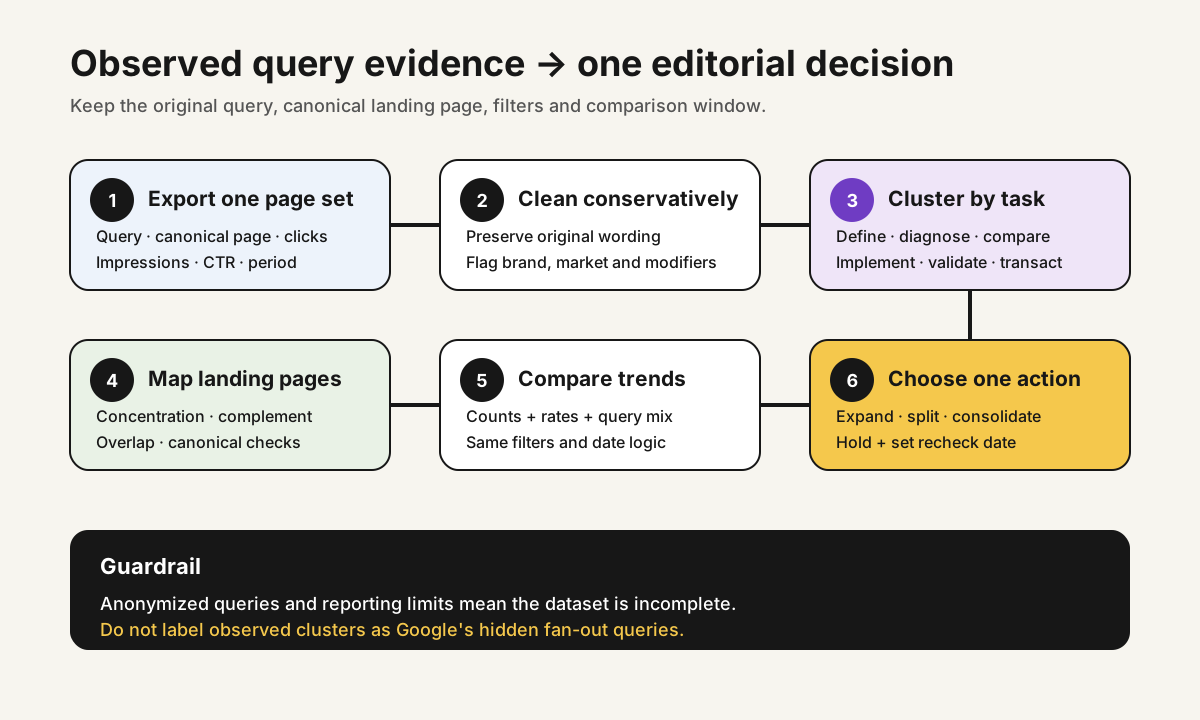
The Six-Step Clustering Workflow
1. Clean The Export Conservatively
Normalize case, repeated whitespace, and obvious punctuation variants. Keep the original query in a separate column. Do not stem words so aggressively that different tasks become indistinguishable.
Add simple flags for:
- Brand versus non-brand
- Product versus informational language
- Language and market
- Question modifiers such as why, how, versus, price, error, and example
2. Assign A User-Problem Family
Cluster by the task a reader is trying to complete, not merely by shared words.
| Family | Typical query pattern | Best content response |
|---|---|---|
| Definition | what is, meaning, explained | Concise explainer |
| Diagnosis | why, missing, blocked, error | Diagnostic workflow |
| Comparison | versus, alternative, difference | Decision criteria |
| Implementation | how to, setup, template | Steps and examples |
| Validation | test, check, verify, audit | Tool or checklist |
| Transaction | pricing, download, service | Product or service page |
The same word can belong to different families. “GPTBot user agent” is a lookup task; “should I block GPTBot” is a policy decision. They should not be merged just because both contain GPTBot.
3. Map Each Family To Landing Pages
Create a pivot table with query family as rows and landing pages as columns. This exposes three useful patterns:
- Concentration: one page owns most visibility for the family
- Complementarity: different pages satisfy distinct stages of the task
- Overlap: several pages compete for the same intent without a clear role
Use Search Console’s query and page drill-down to validate suspicious rows. Regex filters can combine similar terms, and Google’s advanced filtering guide documents RE2 syntax and the | operator for alternatives.
4. Compare Trends, Not Isolated Positions
For each cluster, calculate:
- Total impressions and clicks
- CTR
- Change versus the comparison period
- Count of visible queries
- Share of impressions going to the leading page
- Number of pages receiving meaningful impressions
Average position can move because the query mix changed. A cluster may gain many new long-tail impressions while its blended position falls. That can still represent useful expansion.
5. Choose One Editorial Action
Every cluster review should end with one of four decisions:
- Expand: Add a missing section when the intent belongs on the current page.
- Split: Create a supporting page when the user task is distinct and substantial.
- Consolidate: Merge or clarify overlapping pages that solve the same task.
- Hold: Make no change when the evidence is weak or the page already satisfies the intent.
Do not create a clone page for every modifier. A useful query fan-out content brief organizes subquestions around one decision journey; it does not manufacture thin variations.
6. Record The Hypothesis And Recheck Date
Log the cluster, affected URL, action, evidence, expected signal, owner, and review date. Recheck after enough impressions accumulate. Search Analytics API results are sorted by clicks and do not guarantee every row, so preserve the extraction method with the decision.
A Minimal Operating Sheet
Use one row per query family:
| Cluster | Primary page | 28-day impressions | Trend | Page concentration | Decision |
|---|---|---|---|---|---|
| Crawler policy | GPTBot framework | 3,200 | +18% | 82% | Expand comparison table |
| Log validation | Log analysis guide | 1,100 | +6% | 74% | Hold |
| Bot testing | Bot simulator | 2,450 | -9% | 48% | Review overlap |
These numbers are illustrative. The important field is the decision: the sheet exists to improve pages, not to produce more taxonomy.
Common Failure Modes
Avoid these shortcuts:
- Calling visible query groups “Google’s fan-out queries”
- Treating absent queries as zero demand
- Comparing periods with different filters
- Ignoring canonical URLs during page mapping
- Letting an automated semantic cluster decide page strategy without review
- Publishing many near-duplicate pages from every cluster
- Promising that broader coverage guarantees AI citations
Automated embeddings or language models can suggest group labels, but a human should review ambiguous and commercial queries. The final label must describe a real user task.
Where This Fits In An AI Search Workflow
Query clustering is one evidence layer. Combine it with the AI search visibility scorecard, technical eligibility checks, content-source reviews, and an AI measurement routine.
If the cluster suggests a new page, validate the technical result after launch: indexability, canonical, internal links, rendered content, and structured data where relevant. If it suggests a refresh, document exactly which observed intent justified the edit.
Takeaway
Search Console query clustering does not expose Google’s hidden fan-out process. It gives you a disciplined way to interpret the query evidence your site actually receives.
Start with one page set, group by user task, map clusters to canonical landing pages, compare trends, and finish with a specific editorial decision. That is enough to turn noisy query rows into a defensible content plan.
Sources
- Google Search Central: AI optimization guide
- Search Console Help: Dimensions and groupings
- Search Console Help: Advanced filtering and regular expressions
- Search Console Help: Common performance report tasks
- Search Console API: Search Analytics query
Q&A
Can Search Console show the queries used inside Google's query fan-out process?
No. Search Console reports queries that led users to your site, subject to privacy omissions and row limits. Clustering those observed queries can reveal related user intents, but it cannot reconstruct Google's private fan-out chain.
Should every query cluster become a new page?
No. Create a new page only when the cluster represents a distinct task that the current page cannot satisfy cleanly. Otherwise expand, consolidate, or leave the page unchanged.
What should a query-cluster report measure?
Track impressions, clicks, CTR, trend, the number of distinct queries, landing-page concentration, and the editorial decision. Treat average position as context rather than the only success metric.