Google Preferred Sources: Help Readers Add Your Publication

Google Preferred Sources is a reader choice, not a ranking switch
Google Preferred Sources lets a reader select a publication they want to find more easily in Google Search. For a reader who has made that choice, the publication’s content is more likely to appear in Top Stories with a preferred badge. Google also says the badge can appear in AI Mode and AI Overviews where those features are available.
That is useful for publishers with an existing audience, but it is not a ranking guarantee, a replacement for technical SEO, or evidence that every article will be shown. Keep the work focused on helping a willing reader complete a choice they already want to make.
Check eligibility before adding a promotion
Preferred Sources is available globally in Top Stories in languages where Google Search is available. Google limits the selectable site to a domain or subdomain: example.com and news.example.com can qualify, while example.com/blog cannot.
Use Google’s source preferences tool to search for the exact domain or subdomain first. Do not present an add button or deeplink as proof that the site is eligible; the reader must still be able to find and confirm the source in Google’s flow.
For AI Mode and AI Overviews, the current publisher documentation also requires the site to be included in Search generative AI features. An authorized property owner can check Settings → Search generative AI in Search Console, including any inherited setting. See Google’s control documentation. This is a separate publisher choice, not something a reader’s button click overrides. Check it; do not change a site’s inclusion policy merely to test a button.
Follow the reader’s route, not just the button click
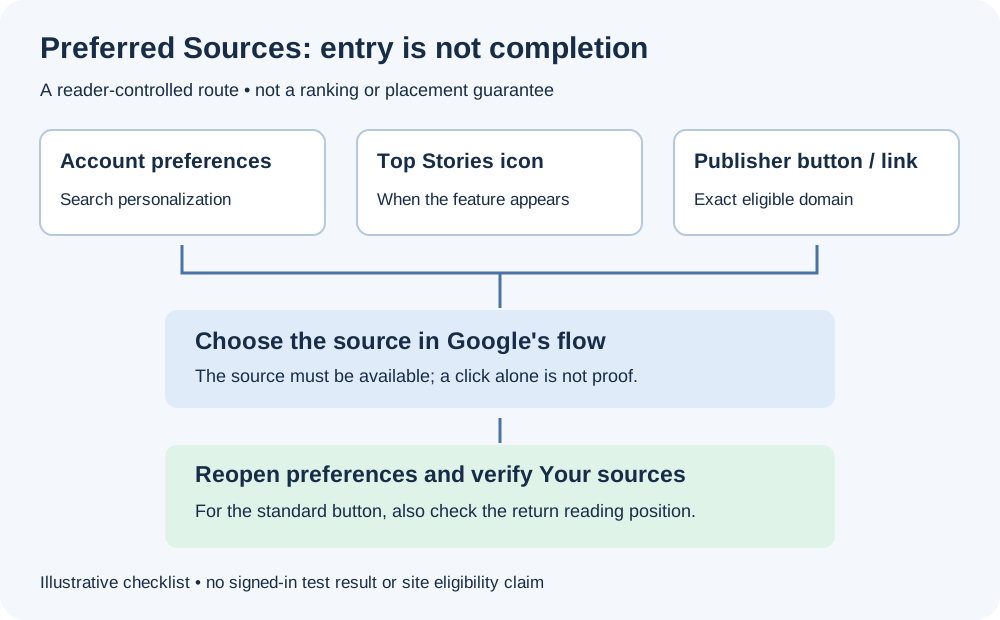
There are three practical starting points. Google’s reader help documents the Search-side routes; the embedded button is a publisher-side shortcut.
| Starting point | Reader action | Completion check |
|---|---|---|
| Google Search or the Google app | Profile picture or initial → Search personalization → Source preferences; search for the publication and select it | Confirm the publication appears in Your sources |
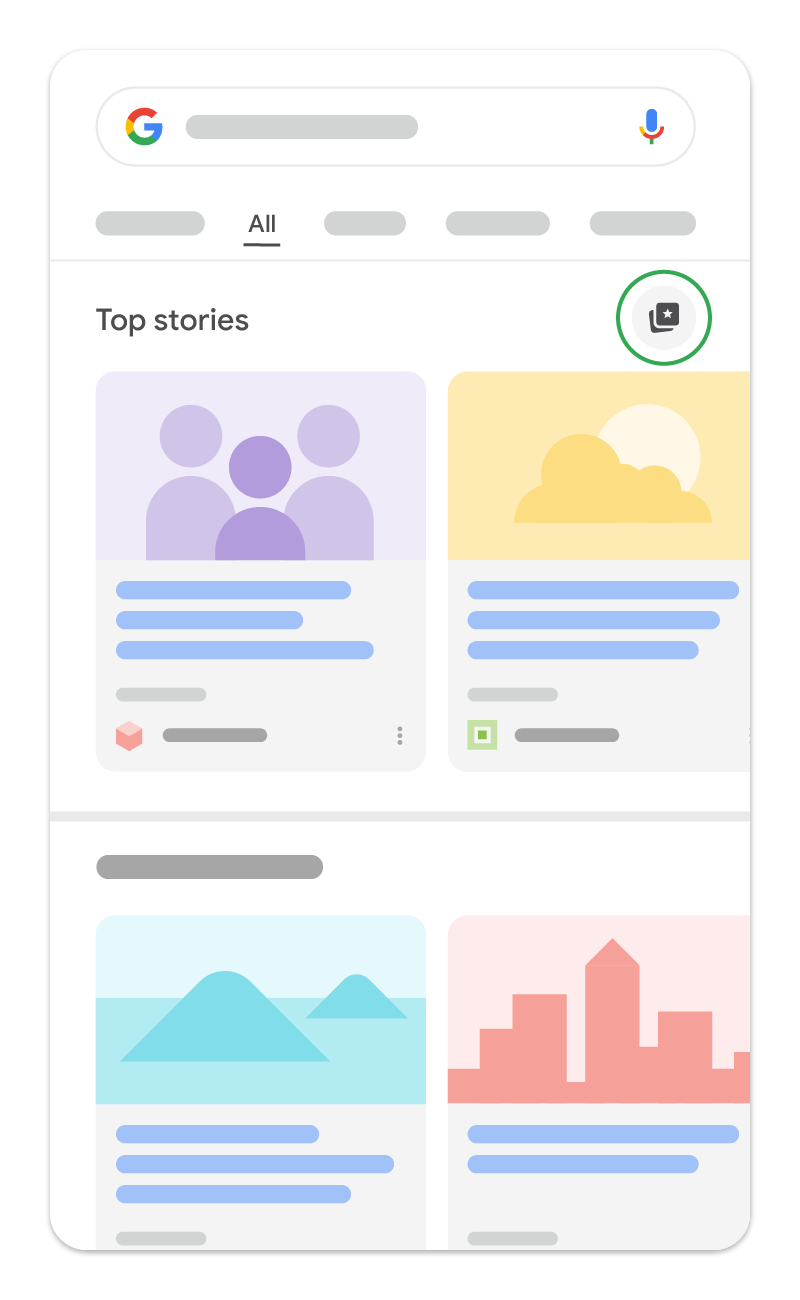
| A news search showing Top Stories | Use the source-selection icon beside the Top Stories heading, select the source, then reload results | Reopen preferences and check the selected source, not just whether the results changed |
| A publication’s interactive button or deeplink | Follow Google’s selection flow for that domain; the standard button is designed to return to the original page | Check the saved selection and, for the button, that the reader resumes at the expected page position |
Signing in when saving lets preferences follow the same Google account across signed-in browsers. If a source cannot be found, first check its exact domain and whether it is updated regularly; do not substitute a similar publication. Top Stories must actually be present for its icon route to be available. A particular menu or AI feature may also be unavailable in a reader’s current setup; use the source preferences tool as an alternative, not a promise of identical screens everywhere.
The August 20 announcement describes the smoother return journey. It does not turn adding a source into an email subscription, payment, or consent to marketing. Discover topic requests and Google News audio preferences are separate controls; an add-source CTA should not claim to configure them.
A small, repeatable acceptance check
Use a consenting test account and a source you can find in the preferences tool. Record device, browser, language, sign-in state, starting URL and entry point. Then:
- Open the source preferences screen first and note whether the source was already selected. Do not count an existing preference as a new addition.
- From a long article, activate the button by keyboard as well as touch or mouse. Complete the Google flow, then check the return URL and reading position.
- Reopen source preferences to confirm the selection. Separately test leaving the flow without adding a source; record what happened instead of assuming success.
- If the button fails to render, inspect the script request and browser console for blocking or policy errors. Try the ordinary deeplink independently; do not weaken the site’s security or consent policy just to make the widget appear.
- Keep any account screenshot private or redact identifiers. With the tester’s agreement, restore only the preference changed for this check.
These are test instructions, not a claim that we completed a signed-in test on this publication. A site can measure a CTA click and the return page, but neither event alone proves that Google saved a preference. Do not invent a completed-add event without a documented integration signal. Use reader-intent research to choose a relevant placement, rather than inserting a promotional prompt into every reader task.
Use the standard interactive button when JavaScript is appropriate
Google’s recommended implementation loads its Preferred Sources library and places a declarative button container on the page:
<script async src="https://news.google.com/swg/js/v1/publisher.js"></script>
<div google-add-preferred-source-btn></div>
The standard button is localized automatically and returns the reader to the page after the selection flow. It can use a light or dark theme, and a site can override the displayed language when that is genuinely necessary:
<div google-add-preferred-source-btn data-theme="dark" data-lang="en"></div>
Add it only where the prompt is relevant—such as a publication landing page or a subscribed-reader surface. Test it on mobile and desktop, verify that it does not disrupt consent or performance controls, and keep it out of unrelated conversion paths.
Choose a deeplink when the button cannot be embedded
If the CMS or page architecture cannot run the interactive button, use a clear text link or accessible image link instead:
https://www.google.com/preferences/source?q=example.com
Replace example.com with the eligible domain or subdomain. A deeplink can also be used in newsletters and social posts, but it should describe the reader action accurately—for example, “Add us as a preferred source”—rather than promise a search-ranking result.
Measure the right outcome
Preferred Sources is optional. Google does not require any of these promotions for a site to appear as a preferred source. Treat it as an audience-choice experiment, with a small implementation and a documented review date.
| Check | What to verify | Do not infer |
|---|---|---|
| Eligibility | The domain or subdomain appears in Google’s source preferences tool | That a subdirectory is selectable |
| Interaction | The button or deeplink completes the reader flow and returns cleanly | That every click becomes a saved preference |
| Search appearance | A preferred badge appears for a reader who selected the source, where the feature is available | A universal Top Stories or AI-feature placement |
| Site health | Articles remain crawlable, useful, and technically sound | That the button improves rankings, E-E-A-T, or Core Web Vitals |
For the broader publishing baseline, use Technical SEO, structured data, Googlebot, and Core Web Vitals. They address discoverability and page quality independently of an individual reader’s source preference.
Implementation checklist
- Search the exact domain or subdomain in Google’s source preferences tool.
- Select the standard interactive button or, where JavaScript is unsuitable, a deeplink.
- Use copy that explains the voluntary reader choice and avoids ranking promises.
- Test the flow, language, theme, return journey, mobile layout, and any consent/performance impact.
- Record the placement and review reader feedback or attributable traffic before expanding it.
Google’s Preferred Sources documentation, checked October 18, 2026 and last updated September 18, is the implementation source of truth. It now covers standard buttons, advanced custom integrations and deeplinks. Recheck the current API examples before implementing custom triggers; the standard route is enough for most publications.