Google Search profiles: eligibility, claiming and multiple brands

Your publication has a website, a YouTube channel and an Instagram account. A Google result shows a profile collecting some of them, but the links are incomplete. Before making a second profile, check whether the existing one is yours and which account can claim it.
Google’s September 16, 2026 Search profiles announcement describes multi-brand management, revised article previews and wider publisher eligibility. The current Help Center is the better place to check today’s requirements. This guide follows those documented steps; it does not claim a completed Fennec application or reproduce a signed-in account test.
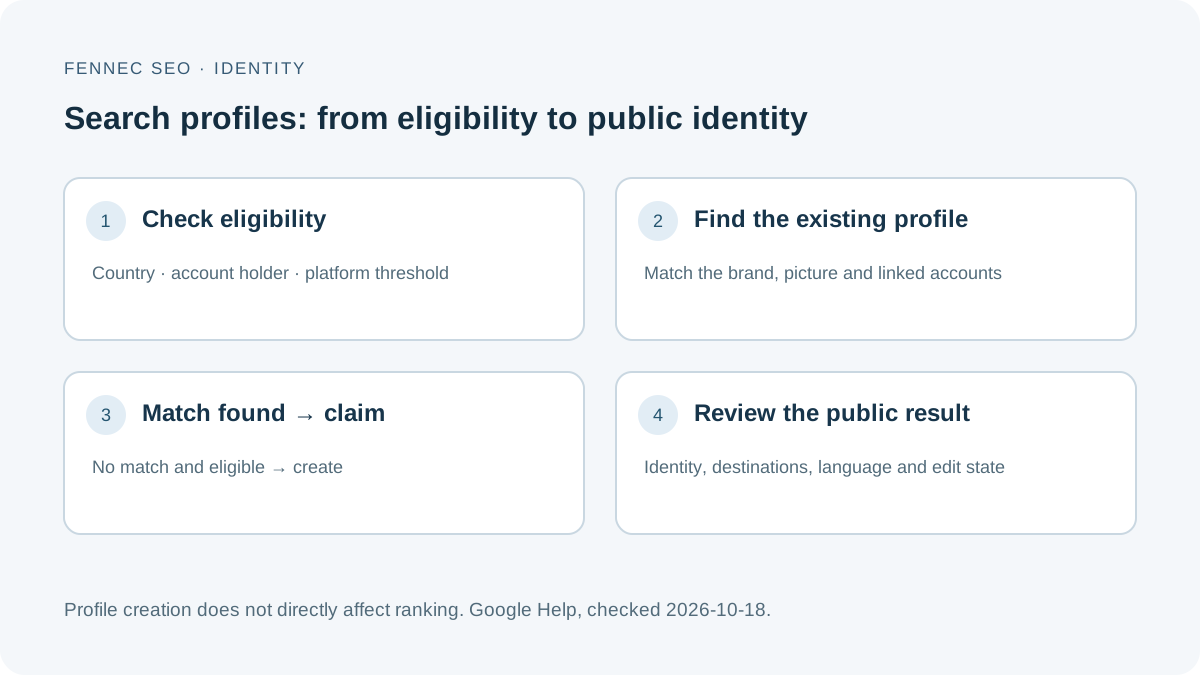
An explanatory diagram based on Google’s help pages, not a screenshot of its interface.
A new reader entry point in AI Mode video results
Google’s October 15 update describes a test of clickable creator and publisher names on AI Mode video results, linking directly to Search profiles. This is a tested entry point, not a promise that every video or profile will receive the link.
If a linked name appears, open it and compare the public name, picture and associated channel with the video you came from. Then inspect the destination of a relevant website or content link. If the identities disagree, record the result URL and mismatch and use the applicable profile correction or Google feedback route; do not claim a similarly named profile to solve a display problem.
For a creator, the practical check is consistency across the video identity, public profile and owned destinations. An absent link is not by itself evidence of a broken profile, and this experiment does not replace the eligibility, claiming or management rules below. We have not reproduced the experimental display in a signed-in account. Neither a clickable name nor a complete profile guarantees video ranking, citations or traffic.
1. Check eligibility before preparing an application
As checked on October 18, 2026, Google’s creation requirements list Canada, India and the United States. They require an adult account holder, policy-compliant content and at least 10,000 followers or subscribers on one supported platform: YouTube, Instagram, X or TikTok.
| Example | What to do |
|---|---|
| A supported creator with 12,000 YouTube subscribers | Check the other requirements, then look for an existing profile. |
| 6,000 Instagram followers plus 5,000 TikTok followers | Do not add them together to infer eligibility; the requirement applies to at least one platform. |
| A Hong Kong publication with 20,000 followers | The documented country list does not include Hong Kong. Check official availability rather than assuming the follower count is sufficient. |
| An existing knowledge panel | Check for a separate Search profile; panel ownership alone does not complete the profile claim. |
These examples illustrate the rules; they are not application outcomes. Recheck the country list and thresholds before starting, because availability can change.
A Search profile brings public identity and content together. A website author page, a knowledge panel and a Google Business Profile have different purposes. Creating any one of them is not a substitute for the others.
2. Find the existing profile and choose the correct account
Search Google for the creator or brand name and its distinctive social handle. Look for View Search Profile beside the knowledge panel, or use Google’s profile claim entry point.
Before continuing, compare the profile’s name, picture and linked platform accounts with your intended identity. A publication, its editor and its podcast can be different identities. A similar name is not enough to establish ownership.
According to Google’s claiming instructions, a linked YouTube channel changes the account choice: use its associated Google Account or a channel account where you are a manager. The flow may require verification of additional linked platforms or further identity information.
Prepare a short private record:
- The exact brand or creator name and public handle.
- The eligible platform and its public account URL.
- The Google Account responsible for the claim, recorded internally.
- Any linked account that appears unrelated and needs correction.
Keep passwords, identity documents and recovery details out of shared content worksheets. Only submit identity information through Google’s official flow if it is requested.
3. Claim a match, or create a new profile when no match exists
Use the existing-profile route when Google presents the right identity:
- Open the official claim entry point and sign in with the appropriate Google Account.
- Authenticate a linked content-platform account when prompted.
- Inspect the returned profile match and select the correct identity.
- Complete any additional checks shown by Google.
- Review the resulting public profile and record any corrections needed.
If there is no existing match and you meet the creation requirements, follow the creation route instead: connect an eligible content-platform account, review any profile the flow discovers, and select Create Profile when appropriate.
The output to verify is one correct public identity with relevant linked accounts. A successful account connection alone does not establish that all requested edits have been accepted.
4. Keep separate brands separate
Google documents support for up to 10 Search profiles per Google Account. Each eligible brand or identity can have its own profile. In the edit view, use the profile switcher and confirm the active brand before changing its description or links.
This is multi-profile management, not a promise of team permissions. Google’s claiming FAQ says a profile can be claimed by one Google Account and does not currently offer multiple administrator roles for that profile. Plan who owns the account and how ownership changes will be handled; use Google’s support route for transfer questions.
For every brand, compare the public profile with its own website identity. The brand SERP checklist and entity SEO guide help organize that comparison. Do not link unrelated accounts simply because the same person can authenticate them.
5. Review what visitors actually see
Google’s profile management guide distinguishes changes that require review from changes that can be saved immediately. A pending name or biography should not be treated as an accepted public correction.
| Check | Evidence to record | If it is wrong |
|---|---|---|
| Identity | Public name, picture and brand represented | Suggest a correction through profile editing. |
| Destination | Final URL and language of each important link | Open it and correct the link or destination. |
| Content | The displayed post belongs to this identity | Review linked accounts and content selection. |
| Edit state | Pending change versus visible public value | Track the review state before resubmitting. |
| Discovery | Search by distinctive handle as well as name | Use Google’s feedback route if a unique identity is still absent. |
A working profile link can still land on the wrong language or an outdated page. The Chrome sidebar walkthrough explains how to verify link destinations independently of an audit label.
6. Measure a profile without calling it a ranking improvement
Google explicitly says creating a Search profile does not directly affect content ranking. Following a creator may influence what that reader sees in Discover; that is different from a general ranking increase.
Keep three records separate:
- Profile management observations: public fields, linked accounts and any insights the product provides.
- Website performance: landing-page visits and useful actions on your own site.
- Search performance for a connected content platform, where an appropriate Search Console platform property is available.
Do not assume every profile view becomes a website visit or that a visit without a clear referrer came from the profile. An AI search visibility scorecard should not award a ranking or citation point merely because a profile exists.
The next useful action is small: verify eligibility, find your existing identity and inspect its links. If access is unavailable, keep your website authorship and public account information accurate while you wait for documented availability.