Google Search Favicon Guide: Implement and Debug the Right Icon

A browser tab can show the right favicon while Google Search still shows a generic icon. That contradiction is the useful starting point: the browser and Google Search are not validating exactly the same thing.
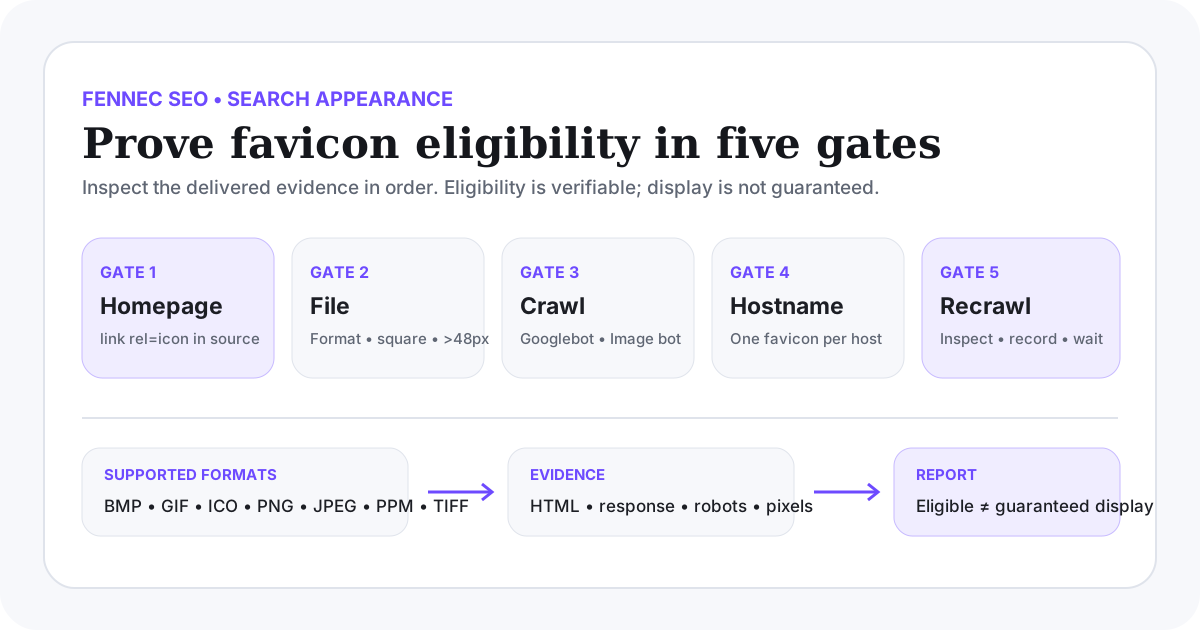
Google’s August 28, 2026 documentation update made one boundary explicit. Google Search currently supports BMP, GIF, ICO, PNG, JPEG, PPM, and TIFF favicon files. The supported formats did not change; Google replaced an evolving external reference with an explicit list. Do not assume that a format is eligible in Search only because a browser can render it.
This guide moves from implementation to evidence. It covers the homepage declaration, hostname scope, crawl access, dimensions, stable URLs, recrawl, and the point where troubleshooting must stop because favicon display is not guaranteed.
The smallest correct implementation
Place a favicon declaration in the <head> of the site’s homepage:
<link rel="icon" href="/favicon-96.png">
Google also recognizes shortcut icon, apple-touch-icon, and apple-touch-icon-precomposed for favicon discovery. For a new implementation, rel="icon" is the clearest default.
The href may be relative or absolute, and the file may be hosted on a CDN. That flexibility does not remove the crawl requirement: Googlebot-Image must be able to fetch the favicon file, and Googlebot must be able to crawl the homepage containing the declaration.
Before changing a template, use the broader Technical SEO workflow to confirm which component owns the homepage <head>. This avoids adding duplicate or conflicting icon declarations in several layouts.
Choose a file Google Search explicitly supports
Google Search’s current list is:
| Format | Practical use | Check before choosing it |
|---|---|---|
| PNG | Strong general default with transparency | Confirm a square source and correct response headers |
| ICO | Useful for legacy browser compatibility | Inspect the embedded sizes instead of trusting the extension |
| JPEG | Valid when transparency is unnecessary | Avoid compression that makes a small mark unreadable |
| GIF | Supported, including the file type | Use a stable, recognizable frame rather than relying on animation |
| BMP, PPM, TIFF | Explicitly supported by Google Search | Confirm browser, build-pipeline, and delivery compatibility before using them |
SVG is not in Google’s explicit Search favicon format list as of the August 28, 2026 update. A site may use SVG elsewhere, but the conservative Search implementation is to declare a supported square raster or ICO file for the favicon that Google should process.
Do not convert the image merely to change its extension. Verify the real file type and response:
curl -I https://example.com/favicon-96.png
file public/favicon-96.png
The first command checks the live response. The second checks a local build asset when you have repository access.
Meet the shape and size requirements
The favicon must:
- use a 1:1 aspect ratio;
- be at least 8x8 pixels;
- remain recognizable at a small rendered size;
- represent the site’s brand;
- avoid imagery Google considers inappropriate.
Google recommends an image larger than 48x48 pixels for quality across Search surfaces. A 96x96 or 144x144 square file is easier to validate than an unusual dimension, while still remaining lightweight after appropriate optimization.
The number in a filename is not evidence. Inspect the actual pixel dimensions and make sure a build tool has not cropped, padded, or replaced the file.
Understand the one-favicon-per-hostname rule
Google defines a site at the hostname level for this feature:
https://example.com/may have one favicon;https://news.example.com/may have a different favicon;https://example.com/shop/cannot define a separate Search favicon from the root hostname.
This matters when a CMS lets every section inject its own <link rel="icon">. A declaration on a subdirectory landing page does not create a second site-level favicon in Google Search.
If a migration involves www, a bare domain, or a subdomain, settle the preferred hostname first. Use the canonical checker to examine consolidation signals, but remember that canonical URLs do not merge hostname-level favicon configuration into one setting.
Test the two crawl paths separately
There are two independent fetches to verify:
- Googlebot must be able to crawl the homepage.
- Googlebot-Image must be able to crawl the favicon file.
A robots rule can allow one and block the other. CDN access controls, hotlink protection, authentication, bot mitigation, or an incorrect content response can also break the favicon request without making the normal homepage look broken.
Start with direct responses:
curl -I -L https://example.com/
curl -I -L https://example.com/favicon-96.png
curl -L https://example.com/robots.txt
Then inspect the homepage source—not only the rendered DOM—for the final declaration:
curl -sL https://example.com/ | grep -iE '<link[^>]+icon'
Use the robots.txt checker to review crawler rules and Bot Simulator to compare the fetched page with what a normal browser shows. These tools narrow the issue; Google’s own observed state should still be checked in Search Console.
A practical troubleshooting sequence
Do not change the icon after every search. Work through the earliest failed gate.
| Gate | Evidence to collect | Common failure |
|---|---|---|
| Homepage declaration | Raw homepage HTML contains a supported link element | Tag exists only on an article, client-side route, or unused layout |
| Final URL | href resolves to the intended stable URL | Relative path resolves incorrectly or redirects through an expired asset URL |
| HTTP delivery | Final request is successful and returns an image | HTML error page, authorization response, redirect loop, or blocked CDN request |
| File eligibility | Actual format is on Google’s supported list | Browser-only assumption or renamed file extension |
| Dimensions | Image is square and at least 8x8; preferably larger than 48x48 | Non-square export, tiny source, or pipeline-generated padding |
| Crawl access | Homepage allowed for Googlebot; file allowed for Googlebot-Image | robots.txt or edge bot control blocks one crawler |
| Hostname scope | Declaration is on the relevant hostname homepage | Attempt to assign a separate favicon to a subdirectory |
| Processing time | Homepage has been recrawled after the verified change | Search result is checked before Google reprocesses the homepage |
If the homepage’s raw HTML is hard to inspect because JavaScript changes its metadata, follow the raw-versus-rendered checks in the Google indexing troubleshooting guide before assuming a Search-specific issue.
When to use URL Inspection
After the implementation passes local and live checks, inspect the homepage in Search Console. Google’s documentation says you may request indexing of the homepage, but processing can still take several days to several weeks.
Use GSC Management to keep the evidence together:
- the exact hostname homepage inspected;
- the date the favicon declaration became live;
- the final favicon URL and file checksum or release reference;
- whether the live test can fetch the homepage;
- whether robots or delivery changed after release;
- the date Search results were checked again.
Repeated indexing requests do not replace a correct implementation, and they do not create a display guarantee.
What not to promise
Meeting the documented requirements makes a favicon eligible. Google explicitly says that a favicon is not guaranteed to appear even when every guideline is followed.
That means a finished technical ticket should say:
- the homepage declaration is present;
- the image meets the format, shape, and size rules;
- Googlebot and Googlebot-Image are not blocked;
- the URL is stable and returns the intended file;
- recrawl was requested or observed, if applicable.
It should not say “Google will now display the favicon.” The final Search presentation remains Google’s decision and can change by query, surface, or processing state. The Google Search visual elements guide provides the broader context for features that site owners can influence but not force.
Release and verification checklist
Before release:
- Confirm the favicon file is BMP, GIF, ICO, PNG, JPEG, PPM, or TIFF.
- Confirm it is square, at least 8x8, and preferably larger than 48x48.
- Confirm the hostname homepage contains one intentional favicon declaration.
- Fetch the final homepage and favicon URL without a logged-in browser session.
- Review robots.txt and edge security for Googlebot and Googlebot-Image access.
- Keep the favicon URL stable across releases.
After release:
- Recheck the live HTML and image response.
- Inspect the hostname homepage in Search Console.
- Record the release date and exact favicon URL.
- Allow for recrawl and processing before judging the result.
- Report eligibility separately from observed Search display.
Google’s favicon documentation is the implementation source of truth. The August 28, 2026 documentation update explains why Google now lists the supported file formats directly.
Q&A
What favicon formats does Google Search support?
Google Search currently lists BMP, GIF, ICO, PNG, JPEG, PPM, and TIFF as supported favicon formats. Browser support for another format does not by itself prove eligibility in Google Search.
What size should a Google Search favicon be?
The favicon must be square and at least 8x8 pixels. Google recommends an image larger than 48x48 pixels, so a square 96x96 or 144x144 asset is a practical choice.
Why is my favicon not appearing in Google Search?
Check that the homepage contains a supported link element, the favicon file is crawlable by Googlebot-Image, the homepage is crawlable by Googlebot, the image is square and supported, and the URL is stable. Even after every requirement is met, Google does not guarantee display.