Universal Cart and Product Data: Diagnose Price and Stock Mismatches

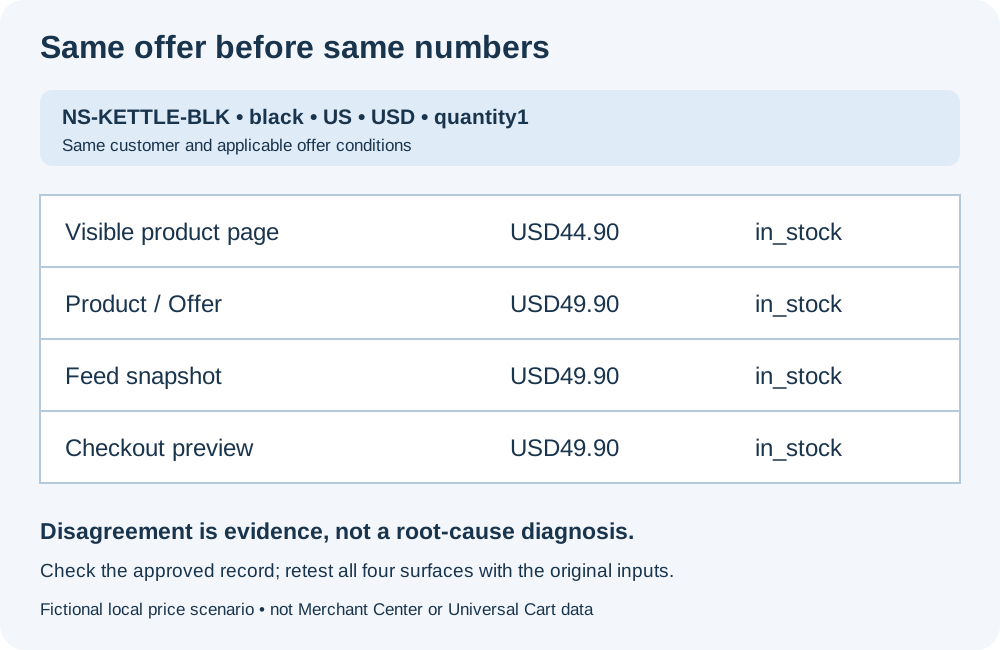
A product page says USD44.90 and in stock. Its markup says USD49.90. The feed agrees with the markup, while checkout rejects the item. Which value should you change?
Not necessarily the minority value—and not automatically the highest or lowest price. First establish that every observation refers to the same item, variant, market, currency, quantity and applicable offer, then compare it with the merchant’s approved pricing and fulfillment state.
Google’s October 15 Universal Cart announcement provides a reason to revisit this work. The U.S. rollout brings saved products from multiple merchants, price and restock alerts, and checkout experiences powered by UCP. The announcement describes 60+ billion Shopping Graph listings. That scale does not make an individual store’s conflicting data correct. Passing a consistency audit does not guarantee Universal Cart participation or a particular shopping display.
This guide diagnoses where a disagreement occurs. For protocol roles, use the agent-commerce comparison; for field coverage, use the Product schema checklist. Here, the output is a repeatable evidence record and a same-input retest.
1. Freeze the comparison key
Write down the SKU or offer ID, color/size/capacity, destination market, currency, quantity, signed-in or membership state, promotion conditions and observation time. Keep the precise landing URL, including variant selectors. A black kettle and a white kettle are not interchangeable because their titles share a product-family name.
Google’s variant documentation describes variant relationships and distinct offer URLs. Follow the actual selected variant before comparing its price or stock. A family-wide “from” price is not necessarily the selected SKU’s price. Use the canonical and language checklist if navigation or URL normalization discards a required selection.
For the local exercise below, the key is NS-KETTLE-BLK, black, US, USD, quantity1, no login or promotion. These are fictional inputs, not a merchant’s real catalog.
2. Capture four surfaces independently
| Surface | Capture | Common reason it cannot yet be compared |
|---|---|---|
| Visible product page | Selected SKU/variant, current amount and currency, stock text and purchase control | A default variant or family-wide starting price is displayed |
| Product/Offer | The matching Product identifier and its actual Offer, price/currency/availability/URL | The template exposes another variant, an old Offer or several ambiguous nodes |
| Product-data feed | Exact item ID, variant, link, applicable price and availability, export/submission time | A parent ID or stale export was selected; effective sale price was ignored |
| Checkout | Same item and quantity, merchandise unit price, stock decision, applicable conditions | A different address, account tier, quantity or promotion is active |
Keep the raw values as well as normalized ones. Inspect both server HTML and the rendered page if JavaScript changes the product facts. With multiple JSON-LD nodes or Offers, do not simply take the first price you find: match the product and offer identifiers. The schema inspection workflow helps locate markup; valid JSON alone cannot establish that its data matches the sale.
For a real feed, record whether you inspected the source export, the submitted version or the platform’s processed item. They can represent different moments. A freshly generated file does not prove that Google has processed it. Do not publish credentials, account identifiers or customer details with the audit record.
3. Reproduce price, stock and identity failures
Download and inspect the self-contained local example server, then run:
node server.mjs
Open http://127.0.0.1:4335/inspect?case=price. The server binds only to loopback and uses fictional Northstar data. It has no Merchant Center connection, UCP checkout endpoint, order creation or payment. Its feed JSON is a normalized teaching snapshot, not an upload payload for Google’s Merchant API. The minimal JSON-LD shows the fields being examined, not a complete rich-result template. Stop with Ctrl+C afterward.
We reproduced four scenarios on October18,2026, extracting the visible HTML, Product/Offer, feed snapshot and read-only checkout preview separately—sixteen surface observations in total:
| Scenario | Observed disagreement | Diagnostic result |
|---|---|---|
price | Same black SKU: page44.90; Offer/feed/checkout49.90 USD; all in stock | Identity matches; price mismatch, not a stock mismatch |
stock | Same SKU and44.90 USD everywhere; page/Offer/feed say in stock, checkout preview says out of stock | Identity matches; stock mismatch, not a price mismatch |
variant | Page/Offer/checkout refer to the black SKU at44.90; feed refers to the white SKU at39.90 | Identity fails; price and stock comparisons are withheld |
fixed | All four surfaces identify the black SKU at44.90 USD and out of stock | Identity matches; neither mismatch remains; checkout preview’s stock decision does not permit an order |
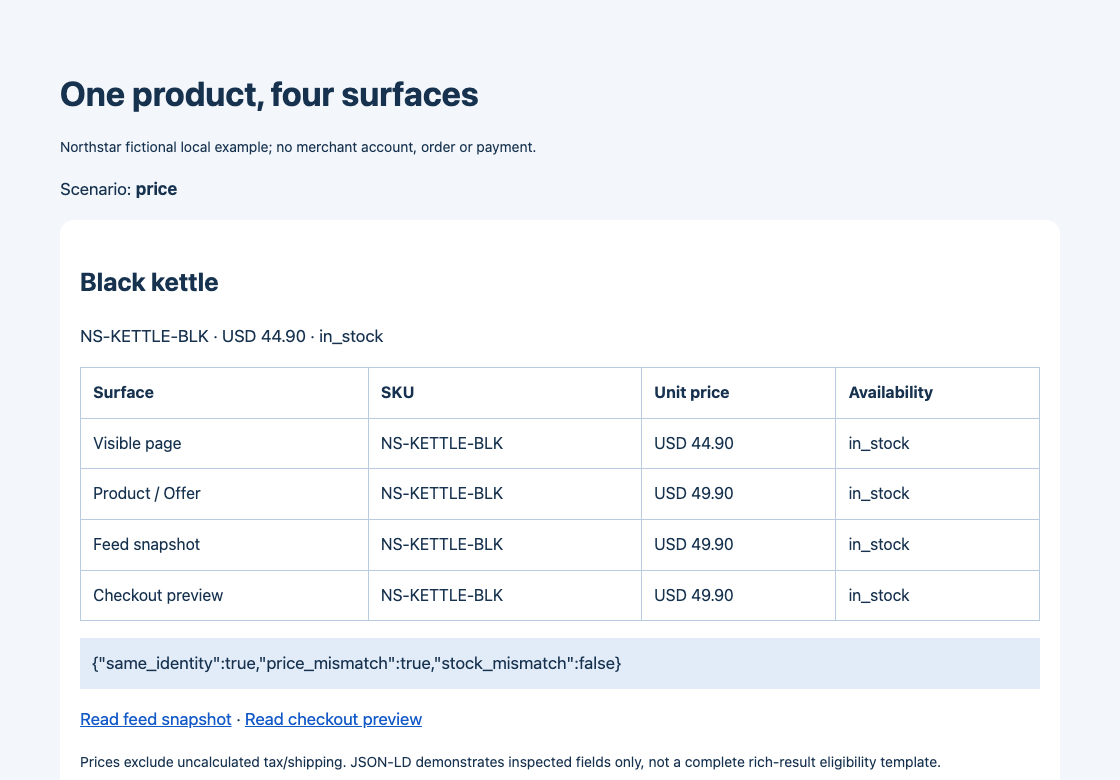
This is a screenshot of the controlled example, not a Google or customer account. The amounts are intentionally configured to disagree; the picture does not establish a real store’s root cause.
To inspect the source responses, substitute stock, variant or fixed for the case value:
curl -sS 'http://127.0.0.1:4335/product?case=price'
curl -sS 'http://127.0.0.1:4335/feed.json?case=price'
curl -sS 'http://127.0.0.1:4335/checkout-preview.json?case=price'
The page response contains visible data attributes and a Product/Offer JSON-LD block. The other two responses provide the feed and checkout observations. /snapshot.json?case=price supplies a convenient comparison, but reading that summary alone is not independent verification of the four surfaces.
4. Normalize the meaning, not just the number
Google’s price requirements require applicable price and currency to agree with the landing page and checkout. That does not mean every number on a page must be identical. Check these distinctions first:
- Unit versus total: compare the merchandise unit price at the same quantity. Keep tax, shipping and other charges in separate fields; a higher order total can be legitimate. Apply the current target-country price rules rather than copying one country’s tax treatment to another.
- Regular versus sale: evaluate the active offer and its effective time. A regular price of49.90 plus a valid active sale price of44.90 is not the deliberately broken regular-price fixture above. See Google’s sale-price guidance.
- Public versus conditional: membership, coupons and quantity breaks need their applicable conditions recorded. Do not compare an unrestricted offer with a price that requires a different customer state.
- Currency and precision: preserve the currency, not just the symbol. The USD example can be compared in integer cents,4490 and4990; do not assume every currency has two decimal places.
- Availability: map
https://schema.org/InStockto the corresponding feed state, but retain preorder and backorder distinctions and dates. Google’s availability guidance distinguishes accepting future orders from not accepting orders.
The fixture excludes tax and shipping calculations and has no promotions. “Not calculated” is not zero, and the checkout preview is not a complete payable total. These exclusions keep its three failure types unambiguous; they are not a ready-made model for a production checkout.
5. Locate the stale or wrong layer before changing it
The price scenario proves disagreement, not which49.90 value is wrong. Compare all four observations with the merchant-approved catalog or pricing rule. Check identifiers, version/update timestamps, export schedules, template generation, client-side replacement and cache state. Those are hypotheses to verify, not causes you can infer from the screenshot alone.
Use the pattern to choose the next check:
| Pattern | Next evidence to collect |
|---|---|
| Only markup differs | Template data source, duplicate Offer nodes, server-versus-rendered state |
| Only feed differs | Item mapping, export version, accepted/processed timestamp and selected variant URL |
| Only checkout differs | Quantity, market/account rules, current inventory/reservation state and pricing-service response |
| Identifiers differ | Resolve the item/variant join before comparing any amounts |
In the corrected local scenario, the designated reference is one shared black-SKU record at4490 cents with out_of_stock. Every surface uses that record. On a real store, do not arbitrarily choose the lowest price or write all prices to match a stale page. A stock correction must also reflect whether orders can really be accepted; changing a label without changing fulfillment behavior is insufficient.
Use technical SEO and page-audit checks for discovery and response problems, but retain commerce-system evidence for stock and pricing decisions. A page scanner is not the inventory or payment authority.
6. Accept the correction with the original inputs
Repeat the same landing URL, SKU, market, currency, quantity and customer state. In the local fixed case, verify all four rows—not just the comparison summary—and read the checkout preview’s stock_permits_order: false. No order is placed. For a real checkout, validate the purchase control and rejection behavior in an authorized test environment; do not complete a purchase to prove the point.
Save a small before/after record:
checked_at | item/variant | market/currency | quantity/customer state
visible | matching Offer | exact feed version | checkout observation
raw values | normalization rules | discrepancies | correction version
same-input retest | remaining unverified boundaries
Retest after the relevant export and cache-update cycle too. One immediate local pass does not prove that a stale value cannot recur. Google-side processing, merchant eligibility and shopping-surface appearance remain separate observations; do not mark them passed because your own endpoints agree.
The practical finish line is modest and useful: the same offer tells the same truth at the moment a customer decides and attempts to buy. That improves data reliability whether or not the merchant ever participates in Universal Cart.