Google AI Search Official Links: Audit Download, Pricing and Help Pages

A Mac user reaches a download page that returns 200 OK, then gets a Windows file. The link is alive; the task is broken.
That distinction matters when a search result sends someone directly to an official action page. In its October 15 announcement, Google said it would test a dedicated section near the top of AI responses for official destinations that resolve particular tasks. It also described more prominent inline links and source context. The official-link display is a test, not a universal rollout or a program you can guarantee entry into.
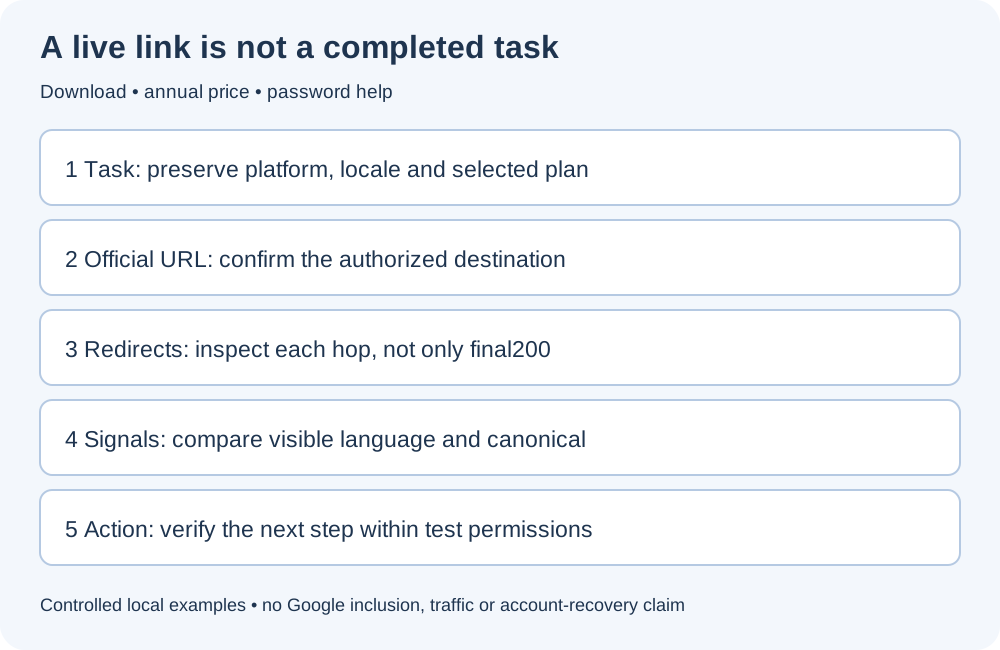
The useful response is to audit the journey after the click: task → correct official URL → redirect chain → language and canonical → usable next action. This guide uses a fictional local website to show three failures and their corrections. It is not an observation of Google’s test, a customer case study, or evidence of increased traffic.
1. Define completion before collecting URLs
“Official” and “useful for this task” are different checks. Establish the real domain or authorized destination using your own product records; a logo and a familiar name are insufficient. Then write an acceptance condition for each task.
| Task and constraint | Candidate destination | What counts as reaching the next usable step |
|---|---|---|
| Download the Mac desktop app | The product’s Mac download route | Correct platform and version are identified; the official file or authorized store link is available |
| Understand Chinese-language annual pricing | The localized pricing page with annual selection | Currency, annual amount, billing interval and material conditions are visible; the selected plan survives the next link |
| Recover access to an account | The password-reset help page | Instructions lead to the authorized reset-request step and explain what to do if it fails |
Do not install a binary, purchase a plan or reset someone’s account merely to finish an SEO audit. Record those as separate functional tests requiring the appropriate permission. An AI citation audit asks whether a page supports an answer; this audit asks whether a reader can reach the intended action.
2. Reproduce three failures on a safe local site
Download the self-contained Node.js example server, inspect the source, and run it in a local folder:
node server.mjs
It listens only at http://127.0.0.1:4334. The fictional product is Northstar. Files are inert text examples; the reset and plan screens are simulations. There is no login, email sending, payment or real installer. Stop the server with Ctrl+C after testing.
The following observations were reproduced on October 18, 2026. All six starting routes—three broken and three fixed—eventually returned HTML with status 200. Their task outcomes differed.
| Case | Broken observation | Fixed observation |
|---|---|---|
| Mac download | /broken/download?os=mac redirects to /broken/en/download/; the platform becomes windows, with a Windows-file link | /fixed/download?os=mac preserves os=mac; the resulting action is /files/mac-demo.txt |
| Chinese annual pricing | /broken/zh/pricing/?billing=annual redirects to English; the page selects monthly billing and canonicalizes to /broken/en/ | /fixed/zh/pricing/?billing=annual stays Chinese, selects annual billing, links to the annual plan review and canonicalizes to its pricing path |
| Password help | /broken/help/reset-password/ returns a generic help center with no reset action | /fixed/help/reset-password/ explains the procedure and links to a reset-request simulation returning 200 |
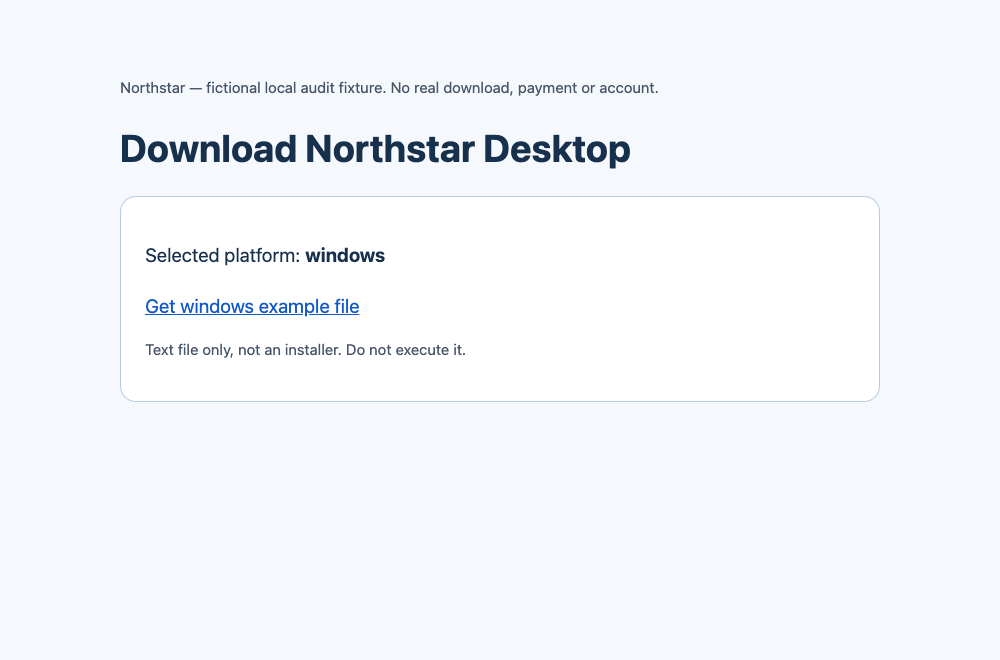
The screenshot is the broken local example, not Fennec’s download service or a Google result. The request started with os=mac; its redirect dropped that constraint. The illustrative file was not executed.
3. Trace the first GET, not just the final status
Start with a request that does not follow redirects, then inspect the complete route:
curl -sS -D - -o /dev/null 'http://127.0.0.1:4334/broken/download?os=mac'
curl -sS -L -D - -o /dev/null 'http://127.0.0.1:4334/broken/download?os=mac'
The first response has 302 and Location: /broken/en/download/. The final response is 200, but the platform parameter has disappeared. Repeat with /fixed/download?os=mac: the redirect retains the platform, and the HTML links to the Mac text file.
Use GET because a site’s HEAD handling can differ. A server-side trace does not expose every JavaScript or meta-refresh navigation; open the same route in a browser and inspect the final address and action target as well. Record each hop’s status, host, path and required parameters. Redact tokens and session identifiers before sharing evidence.
Google’s redirect guidance distinguishes permanent moves from temporary routing. Our fixture uses 302 for demonstration; it is not a recommendation to use 302 for every download page. A correct permanent 301 can still send a reader to the wrong task, while a valid temporary redirect can preserve their intent. Use redirect-chain analysis to locate the transition that loses a platform, locale, billing interval or help topic. Changing the status code alone will not restore a dropped constraint.
4. Compare the destination with its language and canonical signals
Inspect the final response’s visible language, title, H1 and <link rel="canonical">. For real translations, review language-specific canonical URLs and reciprocal alternates rather than automatically canonicalizing everything to English. Use the multilingual signal checklist and Google’s multilingual-site guidance.
In the broken pricing example, three observations disagree with the request: the final language is English, billing is monthly, and canonical points at a homepage rather than a pricing equivalent. Diagnose these separately. A canonical is an indexing signal, not a browser redirect; repairing it cannot by itself change what the customer sees.
The fixed example shows both monthly and annual prices while preserving the selected annual action. Its canonical omits the selection parameter because both choices are represented on the same pricing page. Do not generalize that to variants with materially different content: compare equivalence before normalizing parameters. Google’s canonical guidance concerns duplicate or very similar URLs, not a way to erase meaningful task states. A canonical check supplies evidence, not a substitute for reading the page.
5. Follow one action beyond the landing page
For each task, inspect the next link or control, including its accessible label and keyboard operation. Check the exact destination, selected options and an appropriate response—not only whether a button exists.
On the fixed local help page, the reset link reaches /demo/reset-instructions/, a screen that explicitly confirms it is a simulation. That proves only that this local hand-off exists. On a real site, email delivery, identity verification and actual account recovery remain separate functional checks. A generic help-center homepage is not an equivalent replacement for a retired password-reset article unless it provides an equally clear route to that task.
For downloads, verify the authorized host and platform without launching the file. For pricing, carry the plan and billing interval into a review screen without submitting an order. If authentication blocks further inspection, record the hand-off as unverified rather than as a pass or a failure. The Chrome page-check workflow can help inspect the page and links; it does not certify a payment, installer or recovery system.
6. Retest the same task, with the same constraints
Use one row per route, not a single site-wide “healthy” label:
task | required platform/locale/plan | starting URL | redirect hops
final URL | visible language | declared canonical | next action URL
observed result | unverified boundary | checked at
For the examples, the correction is accepted only when the original Mac request still selects Mac, the Chinese annual route keeps Chinese and annual billing, and the help task reaches the reset simulation. Repeat the browser check at desktop and phone widths; record an inaccessible or hidden action even when its URL is technically valid. Keep the same account state and region when comparing versions, or explicitly note the changed conditions.
For production pages, combine these rows with technical SEO checks: crawl access, indexability, working internal links and maintained sitemaps. Then monitor task completion separately from search impressions. A repaired route does not establish that Google crawled it, selected it for an AI display, or sent more traffic. The AI-feature documentation does not provide a special markup recipe or inclusion guarantee.
A short final checklist
The right official task page should preserve the user’s constraints, declare coherent indexing signals and lead to a usable next step. Ask:
- Is this the authorized destination for this exact task?
- Do redirects preserve platform, locale, topic and selected plan where needed?
- Are visible content, canonical and language alternatives consistent with the page’s purpose?
- Does the next action work up to the boundary we are permitted to test?
- Did the same original request pass after the correction, with evidence and remaining unknowns recorded?
Those are valuable checks whether or not Google’s official-link test ever includes the page.