Google SEO Audit Worksheet: Turn Findings into an Evidence Queue

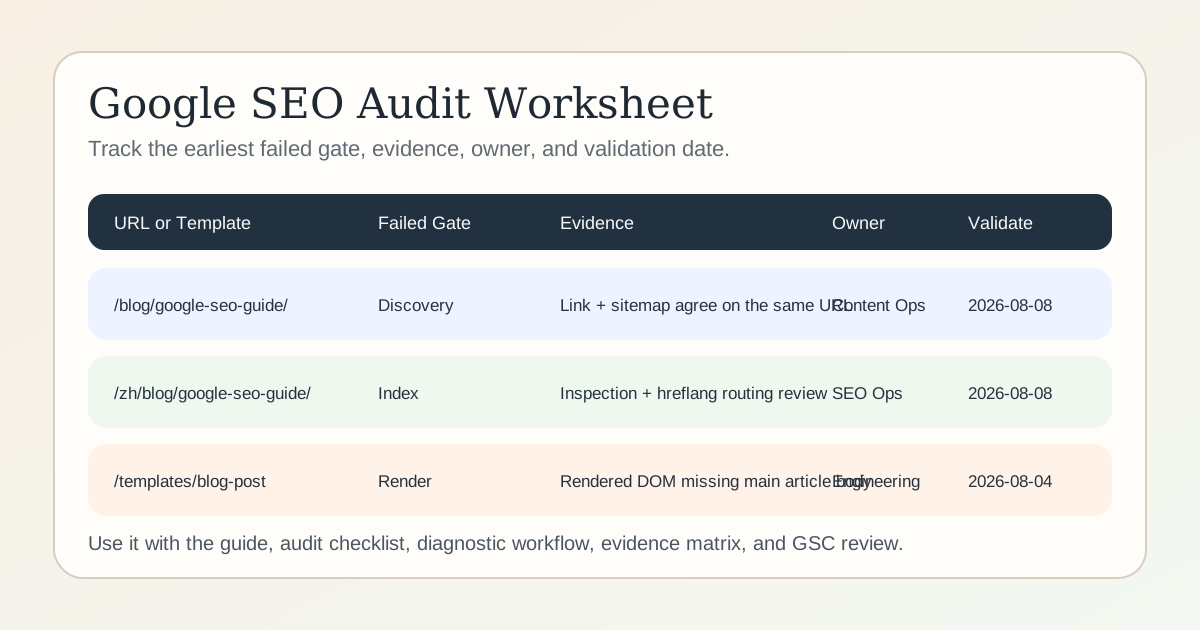
A useful Google SEO audit worksheet is not just a spreadsheet with red and green cells. It is the working queue that ties each finding to the affected URL or template, the earliest failed gate, the evidence that proves the issue, the owner, and the date you will use to validate the fix.
Download the template here:
Delete the sample rows before you use the file with real pages. If you prefer Google Sheets or Excel, import the CSV first and keep the same column names so future audits stay comparable.
The direct answer: what belongs in the worksheet?
Every row should answer six things:
- what URL or template is affected;
- which stage failed first;
- what evidence proves it;
- who owns the smallest safe fix;
- how you will validate the result;
- when you will check again.
If one of those fields is blank, the finding is usually still too vague to prioritize.
This asset fits after the Google SEO diagnostic workflow tells you where to start and before the Google SEO audit checklist becomes a broader release queue. If the team is still arguing about what counts as proof, resolve that first with the Google SEO evidence matrix. If you want one worked bilingual release pass that shows which fields can be filled from live checks and which fields must wait for Google data, review the Google SEO check example.
Worksheet columns
| Column | What to record | Why it matters |
|---|---|---|
url_or_template | Exact URL, route pattern, or shared template name | Prevents generic findings with no scope |
locale | en, zh, or all | Makes language routing and hreflang checks visible |
page_role | Pillar, spoke, product, wiki, template, or other real role | Stops the team from fixing the wrong kind of page |
query_or_task | The main query family or user task | Keeps the row tied to search intent |
failed_gate | Discovery, crawl, render, index, rank, or conversion | Forces earliest-stage diagnosis |
evidence_source | Response, source HTML, rendered DOM, URL Inspection, Performance report, or another reproducible source | Separates proof from interpretation |
evidence_summary | One-sentence factual summary | Makes handoff possible without rewriting the issue |
google_state | Indexed, crawled not indexed, alternate with canonical, or another observed state | Preserves the current Google view |
priority | P0, P1, P2, or monitor | Keeps urgency explicit instead of implied |
owner | Engineering, content, SEO ops, analytics, or another real owner | Turns an insight into an action |
next_action | Smallest safe fix | Prevents oversized rewrites |
validation_check | The exact check you will rerun | Keeps the outcome testable |
validation_date | Planned recheck date | Prevents “fixed” rows with no follow-up |
status | Example, open, fixed, validating, or monitor | Makes the queue readable over time |
notes | Sample URLs, release IDs, or caveats | Preserves useful context without bloating the main cell |
How to fill one row correctly
Start with the symptom, but do not write the symptom as the conclusion.
Bad row:
Traffic dropped. Probably content quality.
Useful row:
/zh/blog/google-seo-guide/->index-> URL Inspection shows self-canonical is correct, but internal links still favor the English URL -> strengthen Chinese links from the pillar cluster -> review query-page-language routing in Search Console after the next crawl.
That structure matters because it keeps each change connected to an observable state.
A practical sequence for this worksheet
1. Route the issue first
Use the Google SEO diagnostic workflow to decide whether the first failure is discovery, crawl, render, index, rank, or conversion. Do not fill the worksheet from memory alone.
2. Capture evidence before interpretation
Good evidence sources include:
- the live HTTP response;
- source HTML;
- rendered DOM;
- URL Inspection;
- Page indexing report;
- Performance report;
- Fennec checks such as Audit, link checker, canonical checker, sitemap checker, and Bot Simulator.
If the row cites only a tool warning and no reproducible page state, it is still incomplete.
3. Keep one row to one finding
If ten pages share the same template defect, make the row about the template and list representative URLs in notes. If one page has three separate problems, split them into three rows so owners and validation dates stay clear.
4. Record the smallest fix
Do not write “improve the page” or “do more SEO.” Write the smallest change that would remove the blocker:
- add a crawlable contextual link from the pillar page;
- remove a wrong-language canonical;
- restore the missing rendered article body;
- rewrite the first-screen answer to match the dominant query task;
- move the CTA so clicks can reach the right product page.
5. Define validation before release
The worksheet row is not complete until it names the next check. Typical validations include:
- source HTML and sitemap both show the preferred URL;
- URL Inspection and live response agree on the canonical;
- rendered DOM contains the missing body copy;
- Search Console shows the intended query landing on the intended language page;
- the page now sends qualified visits to GSC Management or another justified next step.
How this asset connects to the cluster
Use the broader Google SEO guide when you need page-role boundaries and the full operating model. Use the Google SEO audit checklist when the worksheet rows need to become a structured review across samples and owners. Use the Google SEO evidence matrix when the team keeps confusing Google documentation, reproducible page checks, and industry inference.
On Fennec, the practical sequence is:
- collect candidate issues in Audit or a focused checker;
- route the issue with the diagnostic workflow;
- log the finding in this worksheet;
- validate release impact with Search Console or GSC Management.
That sequence is what turns a noisy audit into a repeatable operating system.
Failure modes this worksheet prevents
Treating symptoms as causes
“Low clicks” is not a cause. “The result promises a different task than the page delivers” is a testable cause candidate.
Mixing Google rules with guesses
If a row says “Google penalized this page for low dwell time,” the evidence column is already broken. Keep Google documentation, observed page state, and interpretation separate.
Marking everything P0
Not every warning deserves emergency status. A wrong-language canonical on a key landing page can be P0 or P1. A weak but accurate meta description is usually not.
Closing a row without validation
A row is not done because someone changed a CMS field. It is done when the named validation check confirms the intended state.
Suggested first rows for a bilingual cluster
For an English and Simplified Chinese Google SEO cluster, the first worksheet rows usually cover:
- one pillar page pair;
- one spoke page pair;
- one product page used as the conversion handoff;
- one wiki page that provides discovery support;
- one template-level release risk such as canonical, hreflang, or rendering drift.
That gives you enough scope to spot repeated defects without pretending the whole site was audited.
Sources
- Google Search Central: SEO Starter Guide
- Google Search Central: Search Essentials
- Google Search Central: Technical requirements
- Google Search Central: Link best practices
- Google Search Central: JavaScript SEO basics
- Google Search Central: Build and submit a sitemap
- Google Search Console Help: URL Inspection Tool
- Google Search Console Help: Page indexing report
- Google Search Console Help: Performance report
Q&A
What should a Google SEO audit worksheet include?
It should record the affected URL or template, the earliest failed gate, the evidence that proves the issue, the owner, the smallest fix, and the validation date.
Should one worksheet row represent one page or one issue?
One row should represent one evidence-backed finding. If the same issue affects many URLs, log the shared template or pattern and name representative sample URLs in the notes.
Can this worksheet replace Search Console?
No. The worksheet organizes decisions, but Search Console, live responses, rendered HTML, and page checks still provide the evidence you need to fill it correctly.